Tello Mobile is a US-based mobile virtual network operator (MVNO) established in 2016, operating on T-Mobile’s network. There’s an $8 activation fee and plans start from $5/month. No KYC is required. WiFi-Calling is supported, and you can roam on China Mobile/China Unicom in China.
eSIM and Roaming Info:
- Roams on China Mobile/China Unicom 4G/5G in China (International roaming available only if balance is above $5)
- Supports WiFi-Calling
- eSIM device swapping supported. After deleting the eSIM from the original device while connected to the network, go to My Sim > ESIM > Enter PIN > Activate ESlM to generate a new QR code (maximum 4-5 times on the website; after that contact support for a new code)
- Compatible with iMessage
- +1 US number, 10 digits
Related Rates:
| $5 Monthly Plan Mainland China Roaming Rates: (This is usually the one chosen when activating a new SIM) | Outgoing calls: 100 minutes free (shared with incoming), extra $0.049/min Incoming calls: 100 minutes free (shared with outgoing), extra $0.049/min SMS Sending: Free (WiFi-Calling) SMS Receiving: Free Data: Purchase separately |
| Pay AS You GO Mainland China Roaming Rates: | Outgoing calls: $0.05/min Incoming calls: $0.05/min SMS Sending: $0.01/message SMS Receiving: Free Data: $0.01/MB Note: Pay AS You GO balance is valid for 90 days. To keep the number, recharge $20 every 90 days |
| $5 Monthly Plan + Pay AS You GO Mainland China Roaming Rates: | Outgoing calls: $0.05/min Incoming calls: $0.05/min SMS Sending: Free (WiFi-Calling), $0.01/message (when roaming) SMS Receiving: Free Data: $0.01/MB Note: With an active monthly plan, Pay AS You GO credits do NOT expire |
Activation Tutorial:
Using a domestic (China) IP (do NOT use proxies) visit this link (AFF): https://tello.com/account/register?_referral=P3Z8F2B2, fill in your last and first name, overseas email, password, and enter the referral code: P3Z8F2B2. After signup, you’ll get a $10 bonus. Click: Join Tello! to register

After registering, click Plans

For the first column, select: No data. For the second, select: 100 minutes. Click: I Want This Plan

Enter your registered email and password, then click: Log in

My number: New Tello line (default is fine). US ZIP CODE: enter any valid US ZIP, click: Check ZIP

Choose: eSIM

Enter your address in China—no tax will be charged (recommended).

Enter your Chinese credit card info, click: Finalize Order

If you see this page after successful payment and activation, you’re good to go. If your order gets cancelled, contact me on TG: https://t.me/wkjsMr for assistance. Click: My SlM section

Here, you’ll see your phone number and eSIM QR code. Use a compatible device or physical eSIM card to scan this code.

Before scanning, scroll down to: Emergency E911 Address, click: Edit, and set your 911 address.

You can use an address generator or Google to find a US address. Fill it in and click: Save.

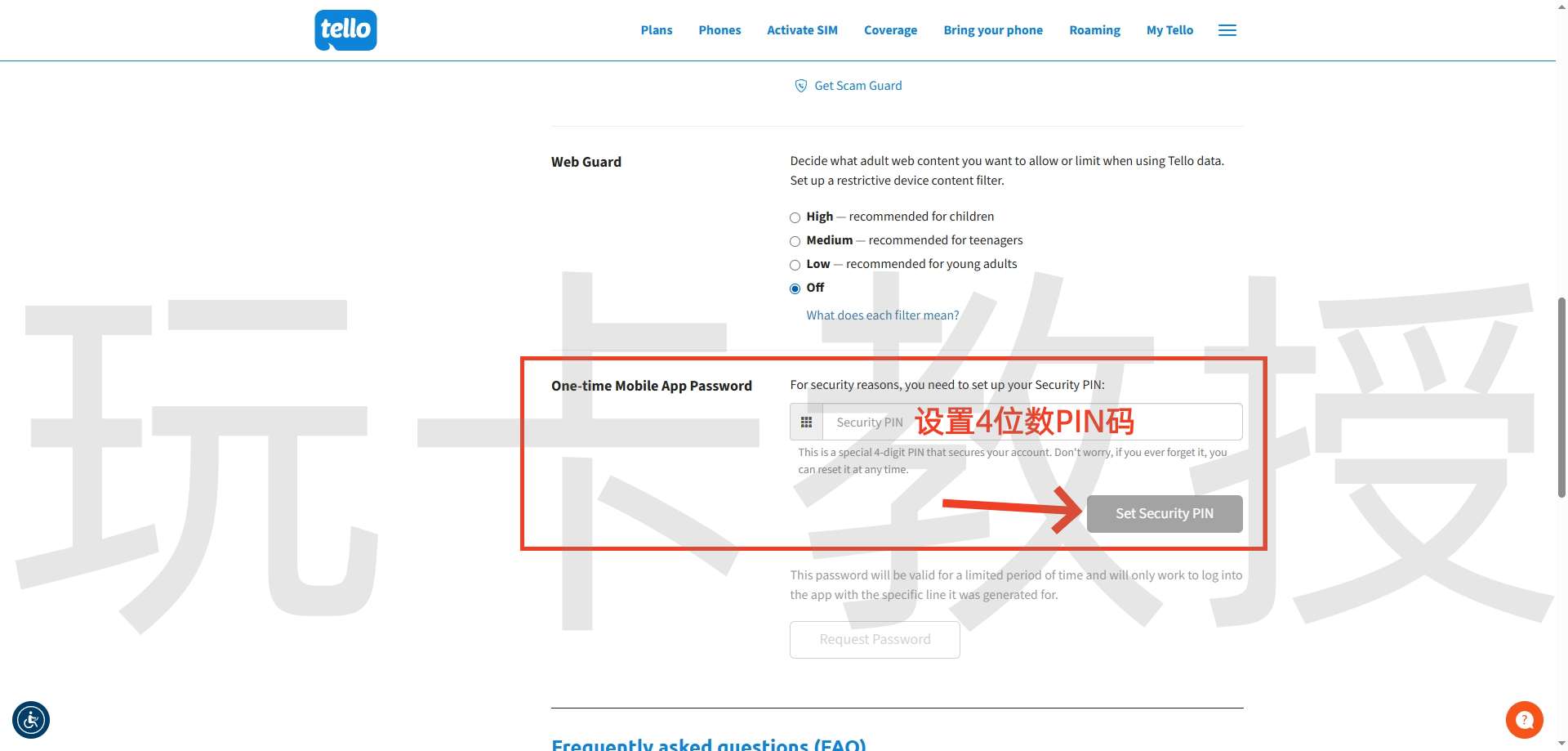
Scroll further down and set a 4-digit PIN, then click: Set Security PlN.
Scroll back up to the eSIM QR code section, and on a device that supports eSIM, or using a physical eSIM, scan the QR code. I’m using an iPhone here: go to Settings > Cellular > Add eSIM > Use QR Code > Scan the on-screen QR > Tap Continue


Tap: Continue (After activation, there is no roaming signal by default; you can only call or text via WiFi-Calling. Once your balance exceeds $5, enable international roaming in your dashboard to roam on China Mobile/China Unicom). Tap: Wi-Fi Calling, then tap: Enable Wi-Fi Calling


Tap: Enable. A 911 address pop-up will appear. Since you filled it on the website already, just tap: Save. WiFi-Calling should now be successfully enabled.


Search for: My Tello in the iOS or Android app store. Enter your Tello number, tap: Request One-Time Password via SMS, get the verification code, enter it, and tap: Login


You can make calls from the Tello App (but not send/receive SMS or incoming calls). Tap the hamburger menu (three bars) to view your current plan. Tap: International Calling to check rates—search by country (e.g. China). The plan is free for calls within allowance; extras are $0.049/min.


Return to Tello’s dashboard. Click: Referral Program to view your $10 signup bonus.

Click: Dashboard to see your plan usage. Click: Renew Now to use your $10 bonus to renew your plan. Make sure to do this before your plan expires, or the system will auto-charge your linked bank card/PayPal.

Scroll to the bottom, click: Tello Dollars, then: Finalize Order

Your order is processing, usually completes within 5 minutes.

Return to the Dashboard page, scroll down to see your top-up balance (only shows deposited balance; your $10 bonus appears under Referral Program). Click: Buy PAYG Credit to top up your account.

Minimum top-up is $20. Enter $20 and click: Order Now

Choose your payment method, then click: Finalize Order

If you see this page, your top-up was successful.

Back in the Tello dashboard, click: Dashboard and scroll down to view your new balance. Click: Cancel Plan And Autopay to switch to Pay AS You GO only; keep in mind you’ll need to recharge $20 every 90 days to retain your number, and this balance expires after 90 days. Pay AS You GO only is not recommended—instead, combine PAYG with a $5 monthly plan to prevent expiry, enjoy roaming, and PAYG rates.

To swap devices, click: My sim, then: ESIM

Enter your 4-digit PIN, click: Confirm Security PIN

Click: Activate ESlM to generate a new eSIM QR code (after 4-5 swaps online, you’ll need to contact support to get a new QR code)

Once you see the QR code, scan it with an eSIM-compatible device or physical eSIM card to add your number to your phone.
